What is Instagram Instants?
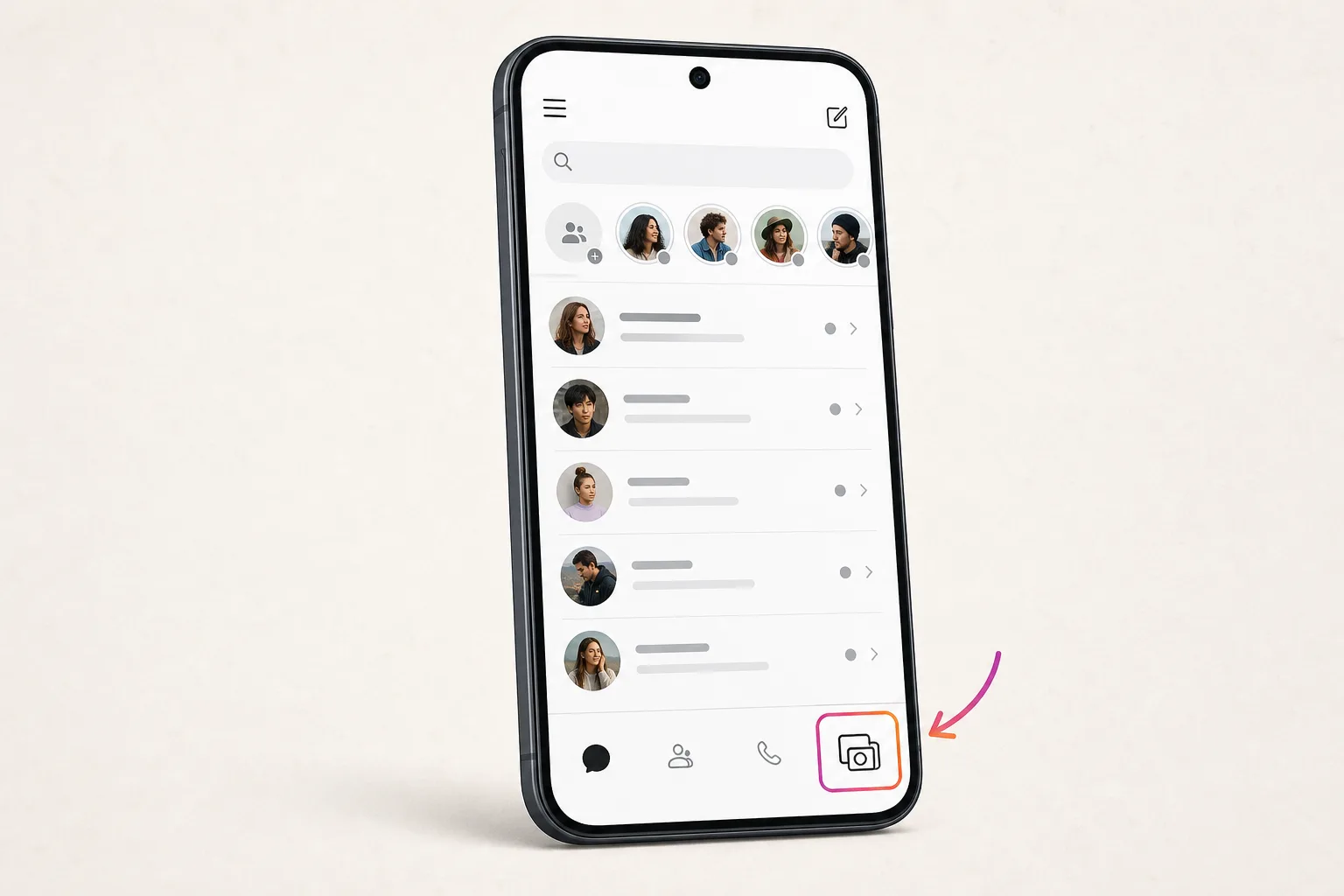
Instagram Instants is a disappearing-photo feature inside Instagram's direct messages, launched globally on May 13, 2026. You'll see it as a small pile of photos in the bottom-right corner of your DM inbox. Tap the pile to open the in-app camera, snap a photo, optionally add a caption, and choose to send it to your Close Friends or your mutual followers — the people who follow you back. You can't upload from your camera roll, you can't edit the photo, and you can't take it back once a recipient opens it.
Meta describes Instants as a way to share authentic moments as they happen, but it's effectively Instagram's answer to Snapchat Snaps and BeReal. Alongside the in-app feature, Meta also released a separate iPhone app called Instants in select countries, which opens directly to the same camera.
How Instagram Instants actually work
Six rules govern how every Instant behaves. First, photos are view-once: each recipient can open an Instant exactly one time, after which the photo is gone for them. Second, any Instant a recipient hasn't opened expires automatically after 24 hours. Third, there's no editing — no filters, no crops, no second take. Fourth, recipients can't screenshot or screen-record an Instant; the prevention is enforced at the app layer. Fifth, there is no viewer list — when you send an Instant, you choose who can see it, but you don't get told who actually opened it.
The sixth rule is about who can send and receive. You can send Instants only to your Close Friends list or to mutual followers — people you follow back. People who follow you but you don't follow can't see your Instants. Recipients can react with emoji, send a reply (which routes to a normal DM), or send their own Instant back.
Your sent Instants are saved privately for up to one year in an archive only you can see. From the archive, you can delete individual Instants, or compile recent ones into a recap and post it to Stories. The undo button appears immediately after sending and works only while the recipient hasn't yet opened the Instant.
How to turn off, hide, or disable Instagram Instants
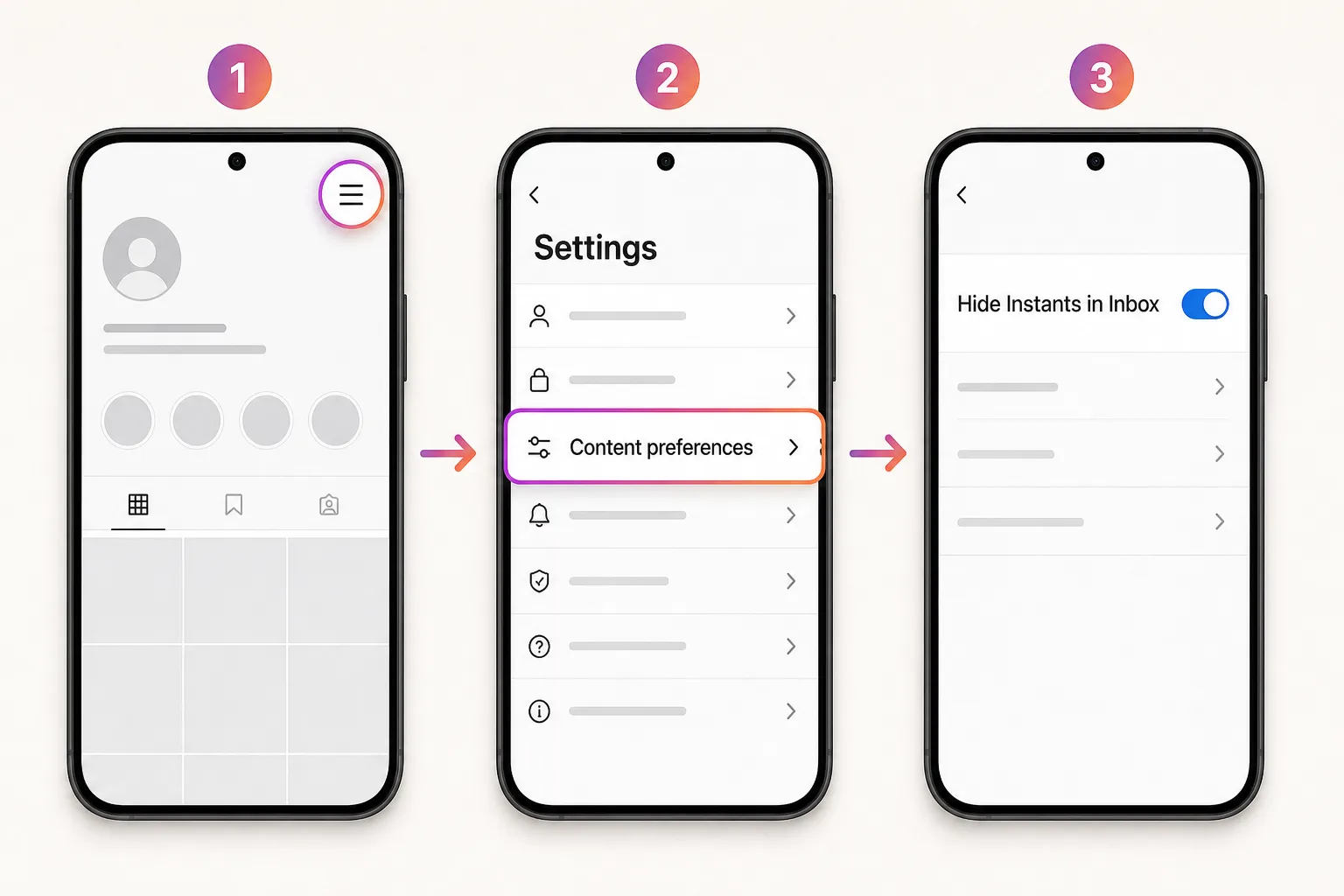
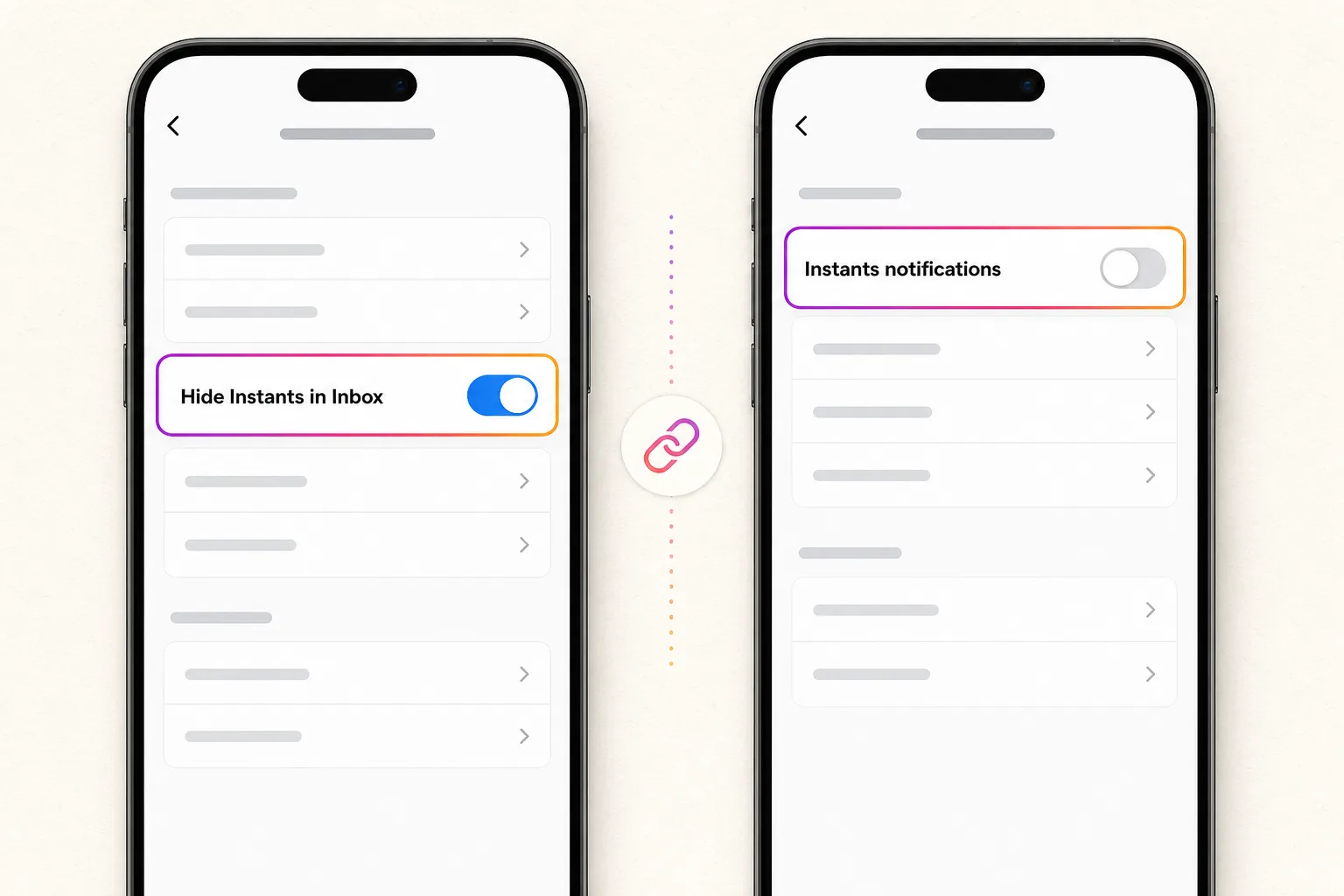
There is no single global kill switch for Instagram Instants — Meta designed the feature to stay present-by-default. What exists instead is a four-level control system, and which one you want depends on what's actually bothering you.
Level 1 — Snooze (temporary). Long-press the Instants pile in your DM inbox and swipe right. The pile disappears for a short period, then returns. Useful for short-term breaks, but not a real off switch.
Level 2 — Hide Instants in Inbox (durable). Open Instagram, tap your profile, open the ☰ menu, go to Settings → Content Preferences, and turn on "Hide Instants in Inbox." The pile no longer appears in your inbox and you stop seeing Instants that others send. This is the closest thing to an off switch.
Level 3 — Mute notifications (separate setting). Hiding the inbox pile does not silence push notifications. Go to Settings → Notifications, find the Instants section, and mute everything there. This is a frequent confusion point reported by users on Reddit and Twitter.
Level 4 — Block specific senders. Standard Instagram block, mute, and restrict controls work on Instants too. Use this if the problem isn't the feature itself, it's a specific person.
One caveat worth knowing: hiding Instants in your inbox does not block the standalone Instants iPhone app. If you've installed that app, you'll need to sign out of or uninstall it separately to fully opt out.
How to retract an Instant you've already sent
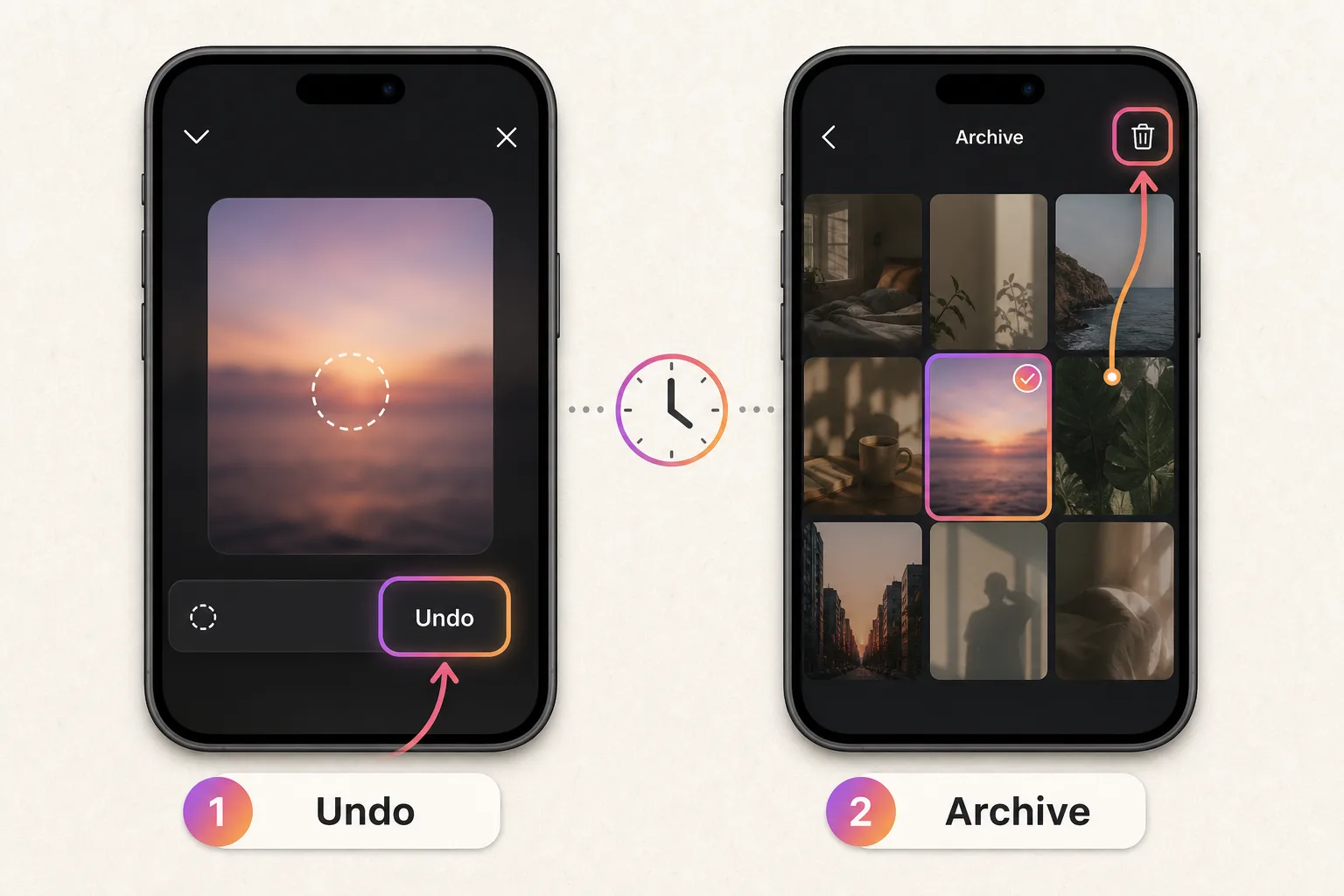
Two retraction paths exist, and the right one depends on whether the recipient has opened your Instant yet.
If the Instant is fresh — within seconds of sending — look for the undo button that appears at the bottom of the screen immediately after you send. Tapping it pulls the Instant back before the recipient has been notified. The undo button only appears briefly, so this path is reliable mostly in the first few moments after sending.
If you missed the undo window but the recipient hasn't opened the Instant yet, open your Instants archive — the entry point is in the top-right corner inside Instants — find the photo, and delete it from there. As long as it hasn't been opened, deletion from the archive unsends the Instant to recipients who haven't viewed it.
If the recipient has already opened the Instant, neither path retrieves it. View-once means view-once: once they've seen it, the photo is gone from their device and from your control. Deleting it from your archive at that point only removes your own copy. If you sent it to the wrong audience (Close Friends instead of mutual followers, or vice versa), there's no way to change the recipient set after sending.
Can people see who viewed your Instants? And other privacy rules
This is where early coverage contradicted itself, so it's worth being clear.
No, you cannot see who viewed your Instants. Meta's official announcement and TechCrunch's first-hand walkthrough both state that Instants has no viewers list — when you send one, you choose the audience, but you don't get told who actually opened it. This is the opposite of Stories, where you can see exactly which followers viewed each frame. (One early third-party article reported the opposite, but the in-app behavior matches the no-viewer-list design.)
What about screenshots? Meta enforces screenshot and screen-recording prevention at the app layer. A recipient can't capture an Instant using normal phone tools, and the announcement specifically commits that friends cannot screenshot or record Instants. This protection is stronger than what Stories or regular DMs offer.
A few other privacy facts worth knowing. Instants can only be sent to mutual followers or your Close Friends list — people who follow you but whom you don't follow back can't receive them. Block, mute, and restrict from standard Instagram controls all work on Instants. Your sent Instants are stored privately in an archive only you can see, for up to one year.
Instagram Instants vs Stories, Snaps, BeReal, and Locket
Instants borrows from several existing formats. The differences matter most when deciding whether to add Instants to a routine that already includes one of these.
Versus Stories: Stories let you see who viewed each frame and last 24 hours regardless of whether anyone opens them; Instants give you no viewer list and disappear the moment they're opened. Stories accept uploads from your camera roll and allow editing; Instants force the in-app camera with no edits.
Versus Snapchat Snaps: both are view-once with screenshot prevention, but Snaps notify the sender when a recipient screenshots, while Instants prevent screenshots outright. Snaps also have a chat layer built in; Instants route replies into your normal Instagram DMs.
Versus BeReal: BeReal forces a daily 2-minute capture window for both front and back cameras; Instants are on-demand and use only the camera you choose. Both aim at unfiltered authenticity, but Instants drop the timing pressure.
Versus Locket: Locket is a friends-only home-screen widget for tiny photos; Instants live inside Instagram's existing audience graph. Locket's audience is small and explicit; Instants inherit your follower relationships.
If you already use Stories heavily, Instants adds a more private, no-viewer-list option for moments you don't want broadcasted to your full following.
The standalone Instants app vs the in-app feature
Meta released two things on May 13, 2026: the in-app feature inside Instagram and a separate iPhone app called Instants in select countries. They share the same camera and the same Instants stream, but they're governed differently.
The standalone app opens directly to the Instants camera, bypassing the Instagram inbox. It's intended as a quicker entry point — you don't have to navigate through DMs. The trade-off is that the "Hide Instants in Inbox" toggle inside Instagram does not block the standalone app. If you've installed it and want to fully step away from Instants, you'll need to sign out of or uninstall the standalone app separately.
For most users, the standalone app adds nothing meaningful that the in-app version doesn't already offer. The same audience rules apply — Close Friends or mutual followers — and the same view-once, no-screenshot, 24-hour expiration mechanics govern both.
Practically: if you came to this page looking to opt out, the safest opt-out is to enable "Hide Instants in Inbox" inside Instagram and skip installing the standalone app. If you came looking to use Instants quickly, the standalone app shaves a few taps off the workflow but otherwise behaves identically.
Common questions
How long do Instagram Instants last?
Instants disappear the moment a recipient opens them. If no one opens an Instant, it expires automatically after 24 hours. Your sent Instants stay in your private archive for up to one year, visible only to you.
Can I see who viewed my Instagram Instants?
No. Instants have no viewers list — unlike Stories, you cannot see which followers opened your Instant. Meta's announcement and TechCrunch both confirm this. You choose the audience when sending, but you don't get a visibility list afterward.
Why is there no 'Hide Instants in Inbox' toggle in my settings?
Either your Instagram app is on an older version — update from the App Store or Google Play — or the toggle hasn't rolled out to your account yet. Meta is rolling Instants out in waves over several days following the May 13, 2026 launch.
Do I need to download the standalone Instants app?
No. Every Instants feature is available inside the regular Instagram app. The standalone app only saves a few taps by opening directly to the camera. Hiding Instants in your inbox does not, however, affect the standalone app.
Can the recipient screenshot my Instant?
No. Meta enforces screenshot and screen-recording prevention at the app layer for Instants. This is stronger protection than Stories or normal DMs, where screenshots are unrestricted and senders are not notified when one is taken.
Stay current as Meta updates Instants
One email per Instants change. No marketing, no spam, unsubscribe anytime.
Sources checked
Changelog
- May 15, 2026 Initial publication after Meta's May 13, 2026 Instants launch.